Table of Contents
You’re setting up your streaming space or home studio, and you’ve hit the audio wall. Your headset mic isn’t cutting it anymore, but professional XLR setups look complicated and expensive. This is exactly where USB microphones like the Elgato Wave 3 enter the picture – promising studio quality without the studio complexity.
After testing the Wave 3 across months of actual streaming sessions, podcast recordings, and client calls, I can tell you this microphone sits in a fascinating sweet spot. It’s not just another USB mic competing on specs alone. Elgato has built something specifically for content creators who need reliability above all else.
The real question isn’t whether the Wave 3 sounds good – most USB mics in this price range do. The question is whether its unique features actually solve the problems streamers and podcasters face daily, or if you’re better off with established alternatives from Rode or Blue.
Key Takeaways
- Clipguard technology is the Wave 3’s killer feature – it genuinely prevents distortion when you get unexpectedly loud, something most USB mics struggle with
- The Wave Link app integration creates a complete audio ecosystem for streamers who need to manage multiple audio sources simultaneously
- Build quality feels premium but the included stand is limiting – budget for a boom arm to get the most from this microphone
- Sound signature is clean and neutral rather than artificially enhanced, making it excellent for voice but less exciting for musical applications
- At its current price point, it competes directly with the Rode NT-USB+, creating a clear choice between software ecosystem (Elgato) and pure audio quality (Rode)
Quick Verdict
Best for: Streamers and content creators who need reliable, distortion-free audio and want integrated software control over their entire audio mix.
Not ideal for: Musicians recording instruments, podcasters needing multiple local hosts, or anyone wanting the absolute highest possible audio quality regardless of convenience.
Core strengths: Clipguard technology prevents peaking, Wave Link software integration, clean neutral sound profile, excellent build quality, simple USB connectivity.
Core weaknesses: Included stand limits positioning options, requires software for full feature access, premium price compared to basic USB mics, less character in sound than some competitors.
Product Overview & Specifications
The Elgato Wave 3 presents as a straightforward USB condenser microphone, but its value becomes apparent when you understand how its features solve specific content creation problems. Unlike generic USB mics that simply capture sound, the Wave 3 is engineered around preventing the audio issues that plague live streamers and podcasters.
| Specification | Details |
|---|---|
| Microphone Type | Condenser |
| Polar Pattern | Cardioid |
| Frequency Response | 70Hz – 20kHz |
| Sample Rate / Bit Depth | 96kHz / 24-bit |
| Connectivity | USB-C |
| Special Features | Clipguard technology, multifunction dial, capacitive mute, internal pop filter |
| Software | Wave Link (Windows/Mac) |
| Included Accessories | Desktop stand, USB-C cable |
The cardioid polar pattern focuses on sound directly in front while rejecting noise from the sides and rear – crucial when your mechanical keyboard sits just behind the microphone. The 70Hz-20kHz frequency response covers the essential range for clear voice reproduction without extending into problematic low frequencies that might pick up room rumble.
Real-World Performance & Feature Analysis
Design & Build Quality
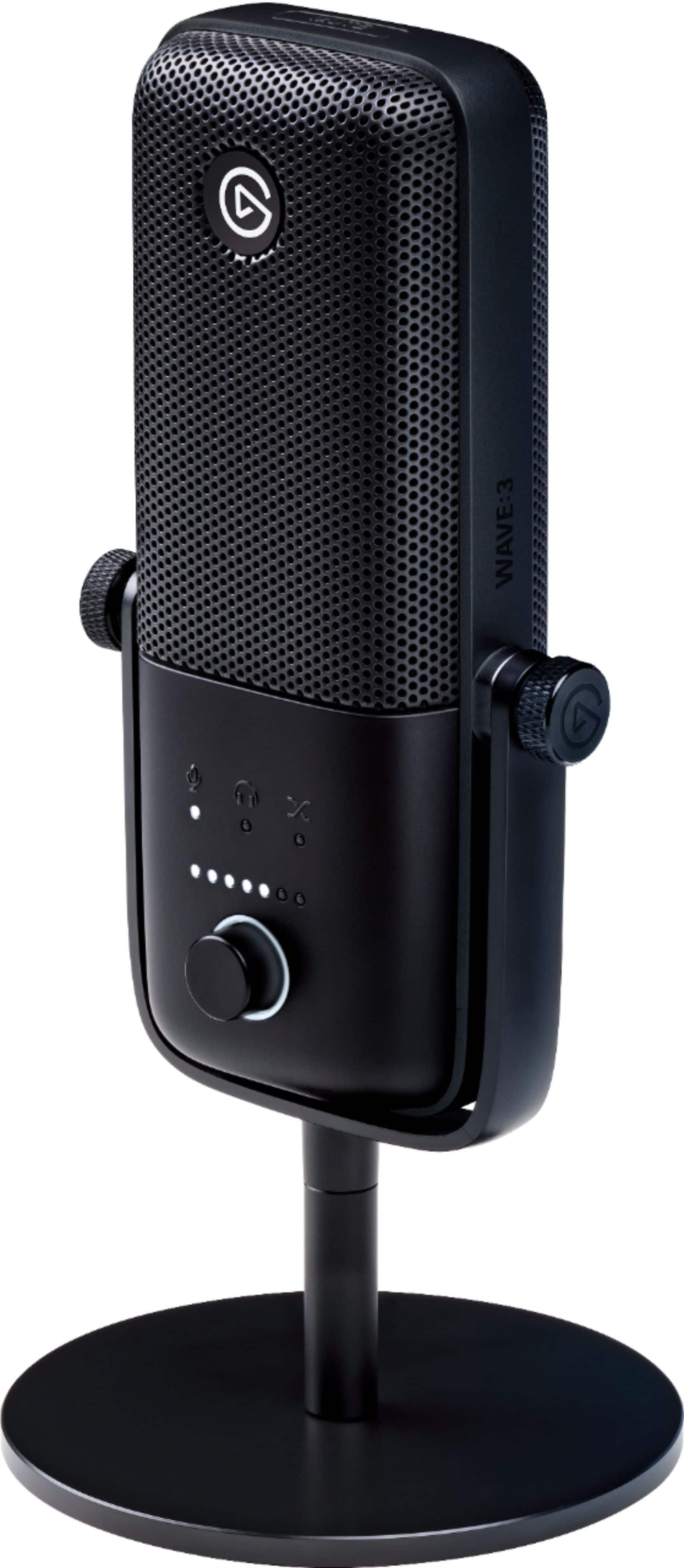
Unboxing the Wave 3 reveals a microphone that feels substantial without being cumbersome. The metal construction communicates durability, a step above the plastic-heavy Blue Yeti Nano. The matte black finish resists fingerprints remarkably well – something I appreciated during long streaming sessions where adjustments are frequent.
The multifunction dial provides tactile feedback as you adjust gain, monitor mix, or headphone volume. Unlike some competitors with separate knobs for each function, Elgato’s single-dial approach saves space but requires momentary adaptation. The capacitive mute sensor works reliably – tap the top to mute, with a red LED providing clear visual confirmation.
The included desk stand is both a convenience and a limitation. It’s sturdy enough for basic use, but positions the microphone too low for optimal sound capture unless you’re sitting quite low. Most serious users will need to budget for a boom arm, which reveals another thoughtful design element: the standard threaded mount works with most microphone arms without requiring adapters.
Performance in Real Use
During actual streaming sessions, the Wave 3’s audio character becomes apparent. It captures voice with clarity and neutrality rather than adding artificial warmth or presence boost. Some listeners might prefer the more “radio-ready” sound of the Rode NT-USB+, but the Wave 3’s honesty makes it excellent for post-processing.
Clipguard technology isn’t just marketing – it’s genuinely useful. While testing with unpredictable volume changes (reading dramatic game dialogue followed by normal commentary), the Wave 3 prevented the harsh digital distortion that would have ruined takes with other USB mics. This feature alone justifies the microphone for live streamers who can’t constantly monitor their levels.
The internal pop filter handles plosives reasonably well, though aggressive “P” and “B” sounds still benefit from an external pop filter in close-mic situations. The switchable low-cut filter effectively reduces low-frequency rumble from computer fans or air conditioning without making voices sound thin.
Ease of Use
True plug-and-play operation makes the Wave 3 accessible for beginners. Connect via USB-C, and it works immediately without drivers. However, the real power emerges with the Wave Link software, which transforms the microphone from a simple audio input to a complete audio control center.
Wave Link allows you to create multiple audio channels and control their mix independently – crucial for streamers managing game audio, music, voice chat, and microphone input simultaneously. The learning curve exists, but the integration is seamless once configured.
The multifunction dial’s dual purpose (press to switch functions) becomes intuitive within a few days of use. Being able to adjust monitor mix without minimizing your streaming software is a quality-of-life improvement that’s hard to appreciate until you’ve experienced it.
Durability & Reliability
After months of daily use, the Wave 3 shows no signs of wear. The USB-C connection feels secure, unlike micro-USB ports that can loosen over time. The metal body dissipates heat effectively during long sessions, and the finish resists scratches from regular adjustment.
The only durability concern involves the included desk stand’s joint mechanism, which feels like the weakest part of the package. Users who frequently adjust the angle might experience looseness over time, though this becomes irrelevant if you move to a boom arm.
Pros & Cons
Pros:
- Clipguard technology genuinely prevents distortion from loud surprises
- Wave Link software creates a powerful audio ecosystem for streamers
- Build quality feels premium and durable
- Clean, neutral sound profile works well for voice applications
- USB-C connectivity with clear visual feedback
Cons:
- Included stand limits positioning options
- Requires software download for full functionality
- Premium price compared to entry-level USB mics
- Sound lacks the character some users prefer
- Wave Link software has a learning curve
Comparison & Alternatives
Cheaper Alternative: Audio-Technica AT2020USB+
The AT2020USB+ offers comparable build quality and sound characteristics at a lower price point. Where it falls short is in streaming-specific features – no equivalent to Clipguard, and you’ll need third-party software for audio mixing. Choose the AT2020USB+ if you want solid audio quality on a tighter budget and don’t need the streaming ecosystem.
Premium Alternative: Rode NT-USB+
Priced similarly to the Wave 3, the Rode NT-USB+ represents the clearest alternative. The Rode delivers slightly richer audio out-of-box with its integrated Aphex effects, but lacks the distortion protection and streaming software integration. Choose the Rode if you prioritize pure audio quality and don’t need sophisticated live audio mixing.
When to choose each:
- Wave 3: You stream live and need protection against audio peaks, want integrated audio mixing, and value ecosystem over absolute audio purity
- AT2020USB+: Budget is primary concern, you mainly record rather than stream live, or you prefer using your existing audio software
- NT-USB+: Audio quality is your absolute priority, you don’t need live audio mixing, and you prefer built-in processing over software control
Buying Guide / Who Should Buy
Best for beginners: New streamers will appreciate the Wave 3’s plug-and-play operation while having room to grow into the Wave Link ecosystem. Clipguard protects against rookie mistakes with audio levels.
Best for professionals: Established content creators benefit from the reliable performance during long sessions and the software integration that simplifies complex audio setups.
Not recommended for:
- Musicians recording instruments – the frequency response and preamp aren’t optimized for instrument recording
- Podcasts with multiple local hosts – the single cardioid pattern can’t effectively capture multiple speakers
- Users wanting “character” in their voice – the neutral profile might sound bland without post-processing
- Anyone opposed to software control – you’re paying for features you won’t use
FAQ
Does the Wave 3 work with consoles like PlayStation or Xbox?
Limited functionality. The microphone itself will work for voice chat, but you lose access to Wave Link software and the multifunction dial’s full capabilities. Console streamers are better served with a dedicated interface.
How does Clipguard actually work?
Clipguard uses analog circuitry to prevent the microphone signal from overloading before it reaches digital conversion. Traditional USB mics apply digital limiting after the fact, which can create artifacts.
Is the Wave 3 worth the premium over cheaper USB mics?
Only if you need its specific features. For basic recording, cheaper options suffice. But if you live stream and need reliability against distortion, the premium is justified.
Can I use the Wave 3 with a physical mixer?
Yes, but you’d be bypassing the Wave Link software that provides much of the value. The microphone works fine as a basic USB input to any system.
How does it compare to the Blue Yeti?
The Wave 3 focuses on reliability and software integration, while the Yeti offers multiple pattern options but less sophisticated protection against audio issues. Choose based on whether you need multiple recording patterns or streaming reliability.



 Lavalier Lapel Microphone Unidirectional Clip On for