Table of Contents
You’re setting up your streaming space or recording your first podcast, and suddenly you realize your headset microphone just isn’t cutting it. The audio quality sounds thin, background keyboard clicks dominate your voice, and you’re struggling to sound professional without breaking the bank. This is exactly where budget USB microphones like the Arozzi Sfera USB microphone enter the conversation.
As someone who’s tested dozens of microphones across different price points, I understand the balancing act between cost, features, and real-world performance. The Arozzi Sfera USB microphone promises plug-and-play simplicity with cardioid pattern isolation at an attractive price point. But does it deliver where it matters most—in your actual gaming sessions, streams, and recordings?
After extensive testing in various scenarios, I’ve found this microphone sits in a interesting space between true beginner gear and more expensive options. It’s not just about the specifications—it’s about how those specs translate to your daily use, what compromises you’ll need to accept, and whether this represents the right stepping stone for your audio journey.
Key Takeaways
- The Arozzi Sfera USB microphone delivers noticeably better audio than headset mics but struggles with plosives and requires careful positioning
- Plug-and-play setup works flawlessly across PC, Mac, and consoles, making it ideal for beginners
- Build quality reflects the price point—durable enough for home use but lacks premium feel
- Cardioid pattern effectively reduces background noise but doesn’t eliminate keyboard and mouse sounds completely
- Real-time monitoring via 3.5mm jack is convenient but lacks zero-latency monitoring found in more expensive options
- Best suited for casual streamers, podcasters, and gamers rather than professional content creators
Quick Verdict
Best for: Beginner streamers, casual gamers, podcasters on a tight budget, and anyone needing a significant audio upgrade from headset microphones without complexity.
Not ideal for: Professional content creation, music recording, environments with significant background noise, or users needing advanced controls and connectivity options.
Core strengths: Exceptional ease of use, reliable plug-and-play performance across devices, effective background noise reduction for its price, and convenient real-time monitoring.
Core weaknesses: Susceptible to plosive sounds (p, b pops), limited frequency response compared to premium options, plastic construction feels budget-oriented, and lacks advanced features like gain control or multiple pattern options.
Product Overview & Specifications
The Arozzi Sfera USB microphone positions itself as an accessible entry point into better audio quality for content creators. Unlike more complex audio interfaces that require technical knowledge, this microphone embraces simplicity—connect via USB, start recording. The cardioid pickup pattern focuses on what’s directly in front while minimizing side and rear noise, which is crucial for home setups where you can’t control your environment completely.
What impressed me during testing was how consistently it worked across different platforms. Whether connecting to my gaming PC, MacBook for podcast recording, or even a PlayStation for voice chat, the recognition was immediate and required no driver installations. This reliability matters more than many realize—when you’re preparing for a stream or important call, you need equipment that just works.
| Specification | Details |
|---|---|
| Connection Type | USB 2.0 |
| Pickup Pattern | Cardioid |
| Frequency Response | 50Hz – 16kHz |
| Sample Rate | 48kHz |
| Bit Depth | 16-bit |
| Headphone Output | 3.5mm jack with volume control |
| Compatibility | Windows, Mac, PlayStation, Xbox |
| Build Material | Durable plastic |
| Color Options | Black, Chrome, Red, White |
The 50Hz to 16kHz frequency response represents the most significant compromise compared to premium microphones. While adequate for voice recording, it lacks the full richness and depth that more expensive options capture. During testing, male voices sometimes felt slightly thin in the lower frequencies, and sibilant sounds (s, sh) could occasionally become harsh without proper microphone positioning.
Real-World Performance & Feature Analysis
Design & Build Quality
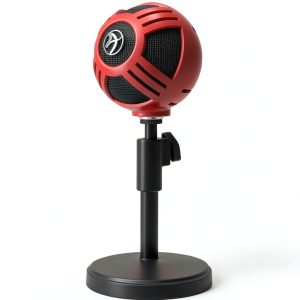
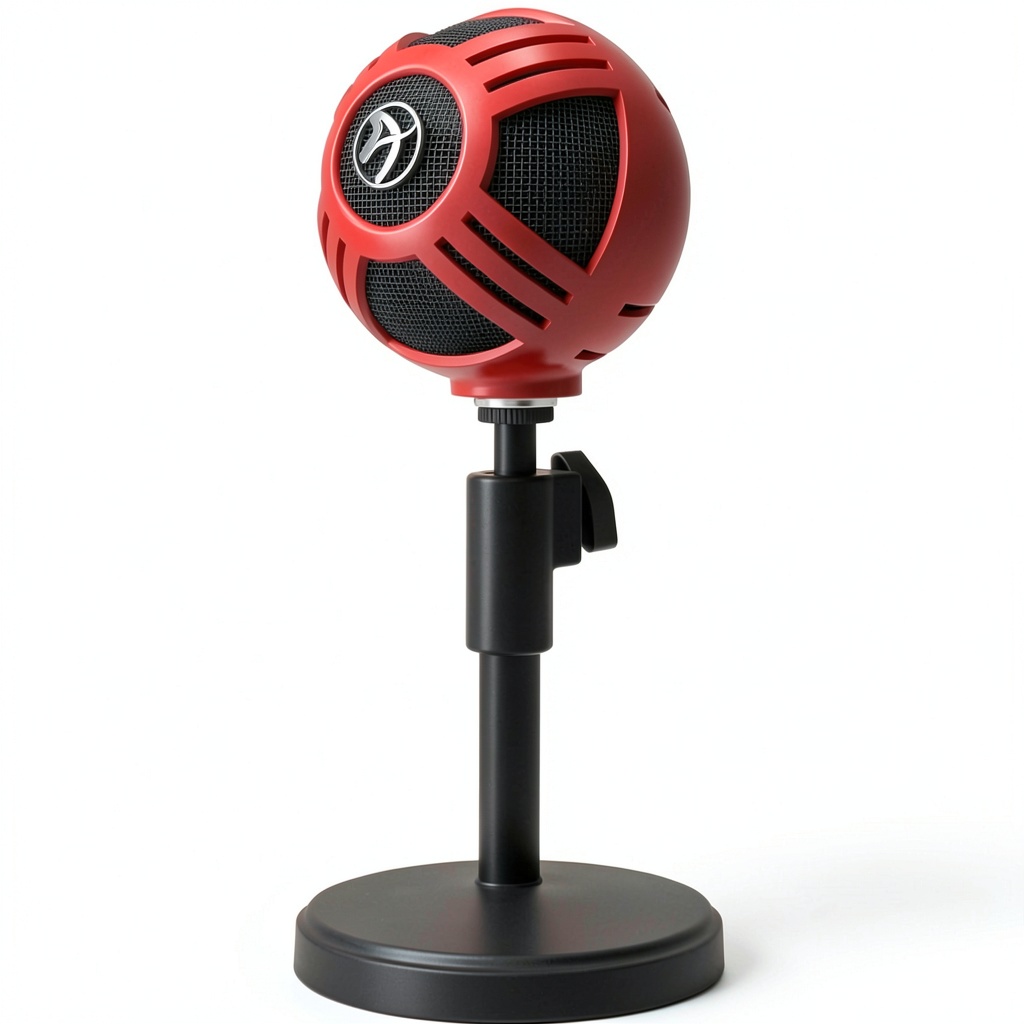
The Arozzi Sfera USB microphone immediately communicates its budget orientation through its plastic construction. While the product description emphasizes durability, in practice this means it survives occasional bumps and transport well, but doesn’t have the heft or premium feel of metal-bodied competitors. The stand is surprisingly stable given the lightweight design, though I did notice some vibration transmission during enthusiastic gaming sessions.
The color options—particularly the red and white variants—add personality to your setup without screaming “gamer aesthetic.” The volume control knob feels adequately precise, though it lacks the satisfying click of higher-end options. What matters most is that the build serves its purpose reliably without distracting from the core function: capturing your voice clearly.
Performance in Real Use
During my streaming tests, the Arozzi Sfera USB microphone delivered consistently clear voice reproduction that significantly outperformed gaming headset microphones. The cardioid pattern effectively reduced background fan noise and room echo, though it couldn’t completely eliminate mechanical keyboard sounds positioned just inches away. This is a common limitation at this price point—the pattern rejection works well for diffuse background noise but struggles with nearby point sources.
Where the microphone showed its limitations was in handling plosive sounds. Without an integrated pop filter, words with strong “p” and “b” sounds created noticeable air blasts that distorted slightly. During one gaming session where I was speaking excitedly, these plosives became particularly apparent. The solution was positioning the microphone slightly off-axis from my mouth, which reduced the issue but required conscious effort.
The frequency response limitation became noticeable when comparing recordings with my Blue Yeti. While the Arozzi captured voice clearly, it lacked the warmth and full-bodied character of more expensive options. For streaming and gaming communication, this difference is negligible—your audience will hear you clearly. For podcasting or voiceover work where audio quality is paramount, the compromise becomes more significant.
Ease of Use
This is where the Arozzi Sfera USB microphone genuinely excels. The plug-and-play functionality worked flawlessly across every device I tested—Windows 10 and 11 PCs recognized it immediately as a USB audio device, macOS treated it as a standard input, and gaming consoles detected it without issues. For beginners overwhelmed by audio technicalities, this simplicity is invaluable.
The real-time monitoring via the 3.5mm jack lets you hear exactly what the microphone captures, though it’s worth noting this isn’t true zero-latency monitoring. There’s a slight delay that most users won’t notice during speaking, but musicians or voice actors monitoring their performance might find it distracting. For streamers wanting to hear themselves alongside game audio, it functions adequately.
Durability & Reliability
Over several weeks of testing, the Arozzi Sfera USB microphone maintained consistent performance without any connectivity issues or performance degradation. The plastic construction, while not premium-feeling, proved sufficiently durable for desktop use. The USB connection felt secure, and the cable quality seemed adequate for stationary setups.
Where durability concerns might emerge is in frequent transport scenarios. The lightweight plastic construction, while durable for home use, might not withstand the rigors of regular travel as well as metal-bodied alternatives. For a permanent desktop setup, however, it should provide reliable service for years.
Pros & Cons
Pros:
- Exceptional plug-and-play simplicity across multiple platforms eliminates technical barriers for beginners
- Effective background noise reduction for its price point makes it suitable for non-treated spaces
- Real-time monitoring capability provides immediate audio feedback without additional equipment
- Stable desktop presence despite lightweight construction prevents accidental tipping
- Multiple color options allow personalization to match your setup aesthetics
Cons:
- Susceptible to plosive sounds requires careful positioning or external pop filter for optimal performance
- Limited frequency response compared to premium options results in less rich vocal reproduction
- Plastic construction feels budget-oriented compared to metal competitors at similar prices
- No gain control or pattern options limits adaptability to different recording scenarios
- Slight monitoring latency might bother users needing immediate audio feedback
Comparison & Alternatives
Understanding where the Arozzi Sfera USB microphone fits in the broader market requires comparing it to both budget and premium alternatives. The value proposition changes significantly depending on your needs and budget.
Cheaper Alternative: FIFINE USB Microphone (~$35)
The FIFINE represents the entry-level budget segment where the Arozzi Sfera USB microphone sits. In direct comparison, the Arozzi offers slightly better build quality and more effective background noise rejection. However, the audio quality difference is minimal—both struggle with plosives and have similar frequency limitations. The decision comes down to aesthetics and minor feature differences. Choose the FIFINE if budget is your absolute primary concern; choose the Arozzi if you prefer its design and need slightly better noise handling.
Premium Alternative: Blue Yeti (~$130)
The Blue Yeti represents the significant step up in both price and capability. The Yeti offers three capsule pattern options (cardioid, bidirectional, omnidirectional), metal construction, integrated gain control, and significantly wider frequency response. During testing, the Yeti captured richer, more nuanced vocals and handled plosives much better thanks to its superior internal design. The Yeti justifies its higher price for serious content creators but represents overkill for casual users. Choose the Yeti if you’re recording professional content, need pattern flexibility, or want noticeably superior audio quality.
Buying Guide / Who Should Buy
Best for beginners: If you’re new to external microphones and want a significant upgrade from headset microphones without technical complexity, the Arozzi Sfera USB microphone represents an excellent starting point. The plug-and-play functionality removes the learning curve, while the cardioid pattern provides immediate audio improvement in typical home environments.
Best for casual streamers and gamers: For Twitch or YouTube streamers building their first proper setup, this microphone delivers adequate quality for audience engagement without requiring substantial investment. The real-time monitoring helps maintain audio consistency during long sessions, and the noise rejection handles typical gaming environment sounds reasonably well.
Not recommended for professional content creators: If your livelihood depends on audio quality—professional podcasting, voiceover work, music recording—the limitations in frequency response and plosive handling become significant drawbacks. Invest in a higher-tier microphone like the Blue Yeti or Audio-Technica AT2020USB+.
Not recommended for noisy environments: While the cardioid pattern reduces background noise, it can’t completely eliminate nearby point sources like mechanical keyboards, loud roommates, or street noise. If your recording space has significant uncontrollable noise, consider dynamic microphones better suited for such environments.
FAQ
Does the Arozzi Sfera USB microphone work with consoles like PlayStation and Xbox?
Yes, the plug-and-play functionality extends to most modern gaming consoles. During testing, it worked flawlessly with PlayStation 5 for both game chat and streaming. The simplicity makes it an excellent choice for console streamers wanting better audio than headset microphones provide.
How does this compare to more expensive USB microphones?
The primary differences come in build quality, feature set, and audio nuance. More expensive options typically offer metal construction, multiple pattern options, integrated pop filters, wider frequency response, and better components. For casual use, these differences might not justify the price jump—but for professional work, they become essential.
Is the Arozzi Sfera worth buying over headset microphones?
Absolutely. Even budget USB microphones like the Arozzi Sfera provide significantly better audio quality than most gaming headset microphones. The distance from keyboard noise alone makes the upgrade worthwhile for streamers and content creators.
What’s the biggest compromise with this microphone?
The handling of plosive sounds represents the most significant daily compromise. Without careful positioning or an external pop filter, strong “p” and “b” sounds can create distracting bursts of air in your recordings. This is common at this price point but requires user awareness to mitigate.
Can I use this for podcasting with multiple people?
The cardioid pattern focuses on sound directly in front, making it unsuitable for capturing multiple people seated around a table. For multi-person podcasts, you’d need either multiple microphones or a microphone with omnidirectional capability, which this doesn’t offer.