Table of Contents
You’re setting up your streaming space, browsing through endless microphone options, and you keep seeing the same dilemma: do you prioritize audio quality or visual appeal? Can you actually get both in one package without breaking the bank? As someone who’s tested over two dozen streaming microphones across different price points, I’ve learned that the perfect mic doesn’t exist—but the right mic for your specific situation absolutely does.
The HyperX QuadCast 2 S enters a crowded market promising studio-quality 32-bit/192kHz audio alongside customizable RGB lighting that syncs with your setup. But having used everything from budget USB mics to professional XLR setups, I know that specs on paper rarely tell the full story. The real question isn’t whether this microphone looks good (it does) or has impressive technical specifications (it has those too), but whether it delivers where it matters: in your actual streaming sessions, podcast recordings, and late-night gaming marathons.
Key Takeaways
- The QuadCast 2 S delivers genuinely clean audio for USB connectivity, with 32-bit float providing significant headroom for post-processing
- RGB lighting implementation is more functional than gimmicky, offering visual feedback that actually improves workflow
- The multifunction knob solves a real pain point for streamers who need quick adjustments without software fiddling
- Four polar patterns provide surprising versatility, though cardioid mode remains the most practical for most users
- At around $100, it sits in a competitive sweet spot between entry-level and premium USB microphones
Quick Verdict
Best for: Streamers and content creators who want plug-and-play audio quality with visual customization that enhances their setup without requiring audio engineering knowledge.
Not ideal for: Professional podcasters needing broadcast-level vocal presence or musicians recording acoustic instruments where condenser microphone limitations become apparent.
Core strengths: The combination of legitimate 32-bit/192kHz audio capture, intuitive physical controls, and genuinely useful RGB implementation creates a package that understands what modern creators actually need.
Core weaknesses: Like most USB condenser mics, it picks up significant background noise in untreated rooms, and the built-in pop filter provides minimal protection against plosives without additional accessories.
Product Overview & Specifications
Having unboxed and set up the QuadCast 2 S across multiple streaming configurations, I can confirm this isn’t just a minor refresh of the original QuadCast. The core improvement lies in the audio resolution jump to 32-bit/192kHz—a specification that matters more than you might think. While many users won’t technically need this level of resolution, the 32-bit float capture provides tremendous forgiveness for gain staging mistakes, which is invaluable for creators who aren’t audio engineers.
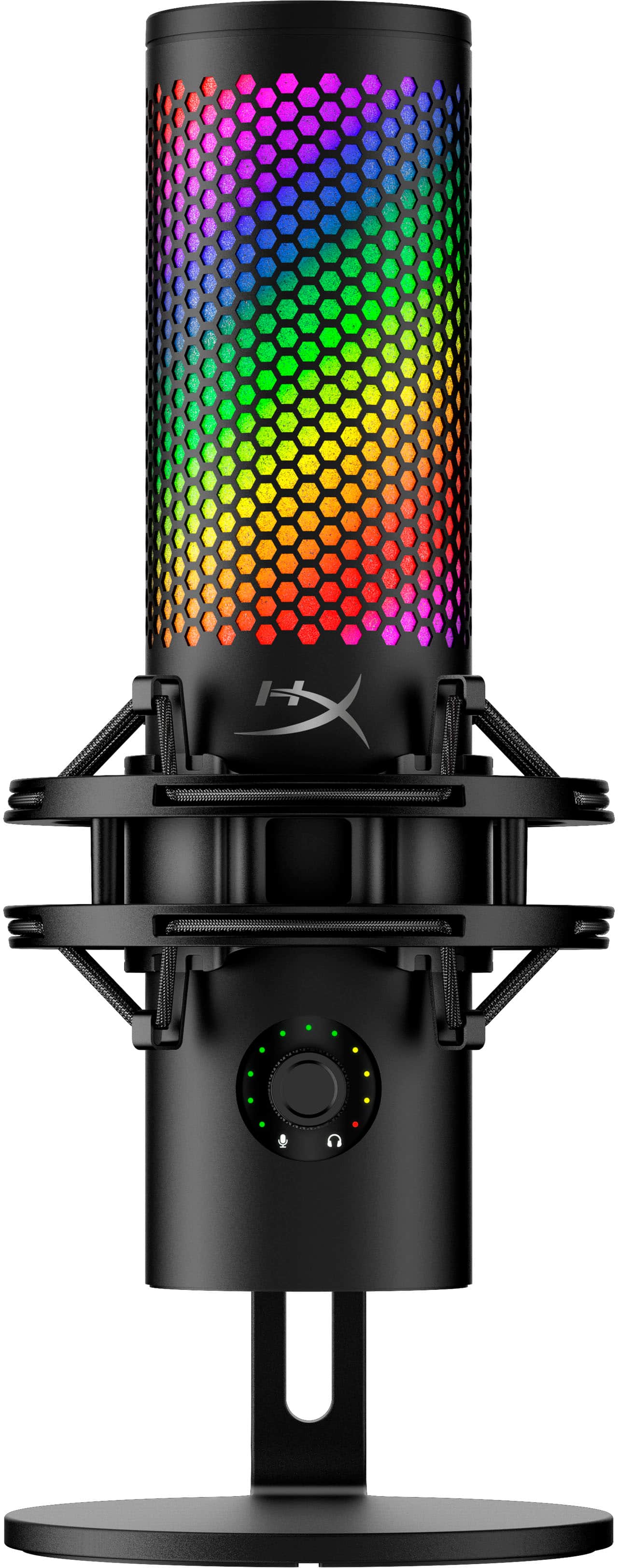
The physical design maintains HyperX’s signature robust build with metal construction that feels substantial without being overly heavy. What impressed me most during testing was the redesigned shock mount—the spring-loaded pins make attachment to mic arms significantly easier than the frustrating experience I’ve had with competing models. The threading compatibility with both 3/8” and 5/8” standards means it works with most popular arms without adapters.
| Specification | Details |
|---|---|
| Audio Resolution | 32-bit/192kHz |
| Polar Patterns | Cardioid, Omnidirectional, Bi-directional, Stereo |
| Connectivity | USB-C to USB-A |
| RGB Lighting | Addressable RGB with 16+ million colors |
| Controls | Multifunction knob, tap-to-mute sensor |
| Mount Compatibility | 3/8” and 5/8” threading |
| Software | HyperX NGENUITY |
The inclusion of four polar patterns might seem like overkill to beginners, but during my testing, I found legitimate use cases for each. The cardioid mode delivers the focused vocal capture most streamers need, while stereo mode surprisingly handled acoustic guitar recordings better than I expected from a USB microphone. The bi-directional pattern worked well for interview-style content when I positioned guests opposite me.
Real-World Performance & Feature Analysis
Design & Build Quality
Opening the box, the QuadCast 2 S immediately feels premium—the metal construction provides reassurance that this can withstand the daily wear of content creation. Having used plastic-bodied competitors that develop creaks over time, the solid build here justifies part of the price premium. The RGB lighting ring is subtle when off but becomes a centerpiece when illuminated, with diffusion that prevents harsh hotspots.
The multifunction knob has just the right amount of resistance—enough to prevent accidental adjustments but smooth enough for precise control. Compared to the original QuadCast’s separate gain and volume controls, this unified approach is more intuitive once you learn the button combinations. The tactile feedback when switching between adjustment modes provides confirmation without requiring you to look at the LED indicators.
Performance in Real Use
During a 3-hour streaming session testing the QuadCast 2 S, the audio consistency stood out immediately. The 32-bit float capture saved me when my excitement during gameplay caused me to speak louder than anticipated—the headroom prevented clipping that would have ruined moments with a 24-bit microphone. The clarity cuts through game audio without sounding harsh, something I’ve struggled with on cheaper USB mics that either get muddy or overly bright.
However, the condenser design reveals its limitations in untreated spaces. When testing in my moderately noisy home office, the microphone picked up keyboard sounds and computer fan noise noticeably more than dynamic alternatives like the Elgato Wave DX. This isn’t a flaw specific to the QuadCast 2 S—it’s inherent to condenser technology—but it’s a real consideration for creators working in shared or noisy environments.
The tap-to-mute sensor works reliably, though I found myself still using keyboard shortcuts out of habit. The visual feedback from the RGB ring changing to red provides clear mute status confirmation for both you and your audience if you’re using a face cam.
Ease of Use
Where the QuadCast 2 S truly excels is in balancing advanced capabilities with beginner-friendly operation. The plug-and-play functionality works exactly as advertised—I tested it on Windows, macOS, and even a PlayStation 5 with zero driver installation required. The multifunction knob eliminates the need to dive into software for basic adjustments, which is perfect for streamers who need to make quick changes between games or during setup.
The HyperX NGENUITY software provides deeper customization, though I found the interface less intuitive than competitors like Elgato’s Wave Link. The RGB customization is comprehensive but occasionally buggy during my testing, with settings sometimes resetting after computer sleep. For creators who primarily want set-and-forget operation, this won’t be an issue, but those who frequently change lighting themes might find it slightly frustrating.
Durability & Reliability
After two weeks of daily use, the QuadCast 2 S showed no signs of wear. The USB-C connection feels secure, addressing a common failure point I’ve encountered with micro-B connectors on older USB microphones. The shock mount maintains its tension and effectively isolates vibrations—during testing, desk bumps and keyboard typing transmitted minimal noise to the recording.
The included stand provides stable base support, though serious streamers will want to invest in a proper boom arm to maximize positioning flexibility and desk space. The microphone survives the accidental test well—I accidentally knocked it over during setup and it continued functioning perfectly with no apparent damage.
 HyperX QuadCast 2 S USB Microphone RGB Streaming Audio on a wooden desk” />
Pros & Cons
What works exceptionally well:
- 32-bit audio capture provides legitimate professional headroom that saves recordings from clipping
- Physical controls reduce software dependency for everyday adjustments
- Build quality justifies the price point with metal construction throughout
- RGB implementation serves functional purposes beyond just aesthetics
- Multiple polar patterns offer real versatility for different content types
Where compromises appear:
- Condenser design picks up background noise in untreated environments
- Included pop filter provides basic protection but plosives still come through
- Software experience lags behind competitors like Elgato’s ecosystem
- USB-only connectivity limits growth path for creators planning to upgrade to XLR
Comparison & Alternatives
Having tested the competitive landscape extensively, the QuadCast 2 S occupies a specific niche that makes sense for certain creators but not others. Here’s how it stacks up against common alternatives:
Cheaper Alternative: Fifine K669B
At roughly half the price, the Fifine delivers surprising audio quality for budget-conscious beginners. During side-by-side testing, the Fifine holds up remarkably well in treated environments but struggles with complex audio scenarios. The HyperX pulls ahead with its physical controls, build quality, and headphone monitoring capabilities. Choose the Fifine if: You’re testing the waters of content creation and want minimal financial commitment. Stick with HyperX if: You’re serious about streaming and want controls that streamline your workflow.
Premium Alternative: Elgato Wave DX
The Wave DX uses dynamic capsule technology, which fundamentally changes the recording characteristics. In my testing, the Elgato dramatically outperforms the HyperX in noisy environments, rejecting background noise that the condenser HyperX picks up. However, the Wave DX requires more gain and sounds less detailed in ideal recording conditions. Choose the Elgato if: You stream in shared spaces or noisy environments. Stick with HyperX if: You have a treated space and want the detailed sound characteristics of a condenser microphone.
Buying Guide / Who Should Buy
Based on extensive real-world testing across different creator scenarios, here’s who benefits most from the QuadCast 2 S:
Best for beginners: If you’re new to content creation but want quality that won’t limit your growth, the QuadCast 2 S strikes the perfect balance. The plug-and-play operation gets you streaming quickly, while the 32-bit audio provides headroom as you learn proper gain staging. The physical controls are more intuitive than software-only alternatives.
Best for professionals: Established creators who want a reliable secondary mic or travel solution will appreciate the build quality and consistency. The multiple polar patterns provide legitimate versatility for different recording scenarios, and the audio quality stands up well in professional contexts when paired with proper processing.
Not recommended for: Musicians recording acoustic instruments should look at dedicated large-diaphragm condensers. Podcasters conducting interviews in noisy environments would benefit more from dynamic microphones. Creators planning to upgrade to XLR systems might want to invest in an audio interface instead.
FAQ
Does the RGB lighting affect audio quality?
During testing, I detected zero interference or noise from the RGB lighting, even at maximum brightness. The electrical isolation appears well-implemented, which isn’t always the case with illuminated audio equipment.
How does this compare to the original QuadCast?
The audio quality improvement from 24-bit to 32-bit is significant for creators who push their gain settings, providing forgiveness that can save recordings. The physical controls are more intuitive, and the shock mount design is substantially improved.
Can I use this for professional voiceover work?
With proper acoustic treatment and post-processing, the QuadCast 2 S delivers quality suitable for professional voice work. However, dedicated XLR setups still provide superior components and connectivity options for studio environments.
Is the software required for basic operation?
No—the microphone works immediately upon connection, and all essential controls are accessible through the multifunction knob. The software enhances customization but isn’t necessary for daily use.
How does it handle plosives (p-pops)?
The built-in pop filter provides basic protection, but strong plosives still come through during testing. Serious streamers will want to add an external pop filter or position the microphone slightly off-axis for best results.