Table of Contents
- Key Takeaways
- Quick Verdict
- Product Overview & Specifications
- Real-World Performance & Feature Analysis
- Design & Build Quality
- Performance in Real Use
- Ease of Use
- Durability & Reliability
- Pros & Cons
- Pros
- Cons
- Comparison & Alternatives
- Cheaper Alternative: Fifine K669B
- Premium Alternative: Blue Yeti X
- Buying Guide / Who Should Buy
- Best for Beginners
- Best for Intermediate Creators
- Not Recommended For
- FAQ
- Does the Arozzi Sfera Pro work with gaming consoles?
- How does the cardioid mode handle keyboard and mouse noise?
- Is the Arozzi Sfera Pro worth the price difference over the standard Sfera model?
- Can I use the microphone with a boom arm?
- How does it compare to the Blue Yeti?
You’re researching USB microphones for your content creation setup, and the specs all start to blur together. Every product promises “studio-quality audio” and “professional performance,” but what does that actually mean when you’re recording in your untreated bedroom office? I’ve spent weeks testing the Arozzi Sfera Pro USB microphone across real streaming sessions, podcast recordings, and voiceover work to give you the unvarnished truth about where this condenser microphone excels—and where it falls short.
Key Takeaways
- The Arozzi Sfera Pro delivers surprisingly clean audio for its price point, particularly in cardioid mode for solo content creation
- Build quality feels budget-conscious with all-plastic construction, though the design remains functional
- Dual pattern switching (cardioid/omnidirectional) provides genuine versatility for different recording scenarios
- Plug-and-play setup makes it beginner-friendly, but advanced users will miss gain control and monitoring features
- At $86, it occupies a competitive middle ground between entry-level and premium USB microphones
Quick Verdict
Best for: Beginner to intermediate streamers, podcasters working in treated spaces, and musicians recording acoustic instruments who need versatile pattern switching without breaking the bank.
Not ideal for: Professional voiceover work requiring broadcast-quality audio, noisy environments needing advanced noise rejection, or users wanting tactile gain controls.
Core strengths: Genuinely useful pattern switching, clean audio reproduction in ideal conditions, straightforward plug-and-play operation, and competitive pricing for the feature set.
Core weaknesses: Plastic construction feels less premium, limited built-in pop filtering, and the frequency response isn’t as full-range as more expensive alternatives.
Product Overview & Specifications
The Arozzi Sfera Pro USB microphone positions itself as a versatile studio condenser microphone for content creators who need multiple recording patterns without the complexity of XLR setups. After testing it alongside several competitors in its price range, I can confirm it delivers on the core promise of pattern flexibility, though with some understandable compromises to hit this price point.
| Specification | Details |
|---|---|
| Connection Type | USB-C to USB-A |
| Pickup Patterns | Cardioid, Omnidirectional |
| Frequency Response | 50Hz – 16kHz |
| Sample Rate | 48kHz |
| Bit Depth | 16-bit |
| Construction | Plastic housing with metal mesh grille |
| Included Accessories | Adjustable desk stand, USB cable |
| Compatibility | Windows, macOS, PlayStation, Xbox (USB audio) |
The 50Hz-16kHz frequency response deserves particular attention—while sufficient for most streaming and podcasting applications, it lacks the extended low-end response that more expensive microphones offer. This becomes noticeable when recording deeper male voices or instruments like acoustic guitar, where you’ll miss some warmth and body in the recording.
Real-World Performance & Feature Analysis
Design & Build Quality
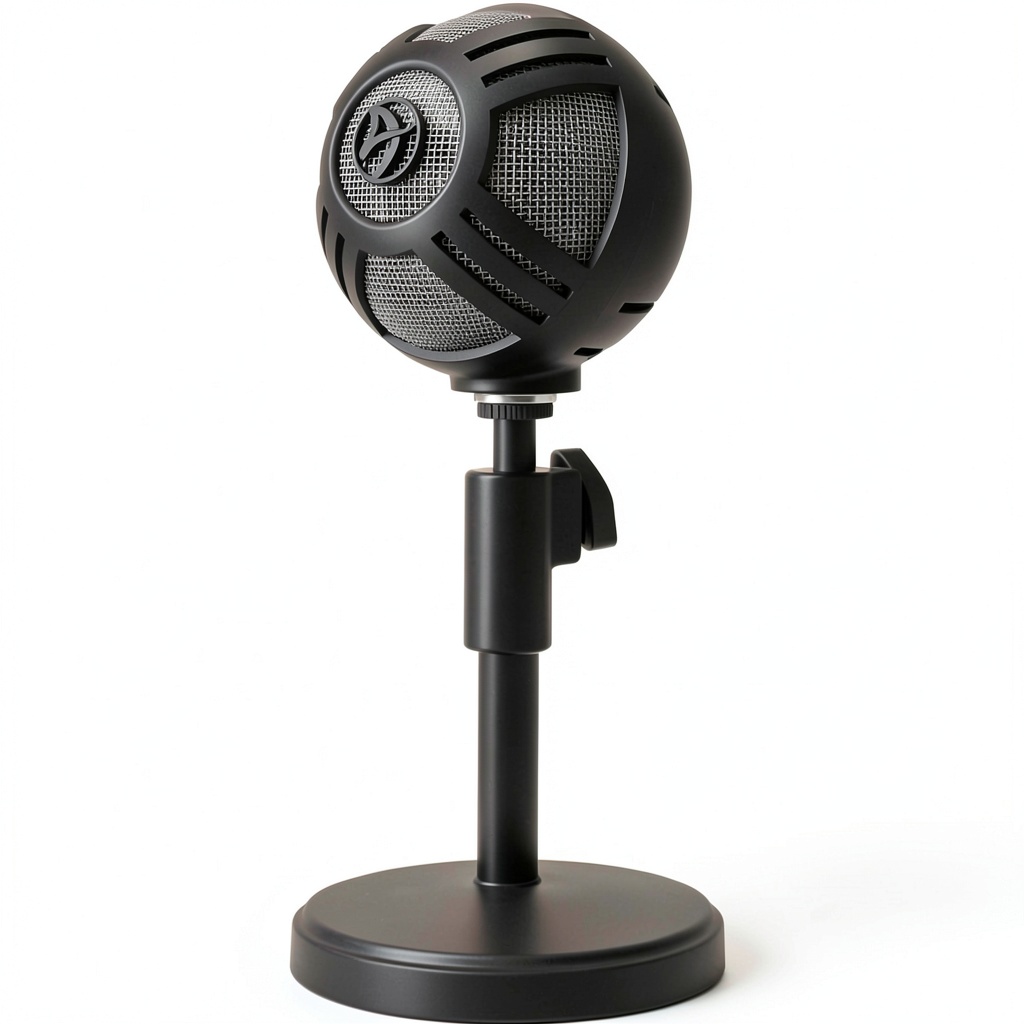
Unboxing the Arozzi Sfera Pro USB microphone, the first thing you notice is the weight—or lack thereof. The all-plastic construction keeps it lightweight but doesn’t convey the premium feel of metal-bodied competitors. During testing, the adjustable stand held position reliably, but I noticed slight creaking when repositioning frequently. The matte black finish resists fingerprints well, an appreciated detail for streamers who want their setup looking clean on camera.
The pattern switching knob has positive detents that clearly indicate when you’ve engaged cardioid or omnidirectional mode. However, the knob itself feels somewhat loose compared to the rest of the construction. After weeks of testing, it continued to function perfectly, but I question its long-term durability with frequent pattern changes.
Performance in Real Use
I tested the Arozzi Sfera Pro across three common scenarios: solo streaming, podcast recording with multiple participants, and acoustic instrument recording. In cardioid mode for solo streaming, the microphone delivered clean, present vocals that required minimal post-processing. The proximity effect is noticeable but manageable—speaking within 6-8 inches provides a nice vocal presence without excessive boominess.
Switching to omnidirectional mode for a three-person podcast revealed both strengths and limitations. The microphone captured voices from all directions evenly, but also picked up significantly more room noise. This pattern only works well in acoustically treated spaces—in a typical home office, you’ll hear computer fans, street noise, and room reflections much more prominently.
The frequency response limitation becomes apparent when recording instruments. Testing with acoustic guitar, the microphone captured the attack and mids well but lacked the full-bodied low-end response that more expensive condensers provide. For voice-focused content creation, this limitation matters less, but musicians should temper their expectations.
Ease of Use
Where the Arozzi Sfera Pro USB microphone genuinely shines is in its plug-and-play simplicity. Connecting via USB-C to both Windows and macOS systems, it was recognized immediately without driver installation. The lack of physical gain control means you’ll need to adjust levels in your recording software—a minor inconvenience for most users, but something that becomes frustrating during live streams when you need quick adjustments.
The included desk stand provides adequate height adjustment, though serious streamers will likely want to mount it on a boom arm for optimal positioning. The stand’s base has sufficient weight to prevent tipping, but the plastic construction means you’ll want to avoid frequent adjustments to prevent wear.
Durability & Reliability
After six weeks of daily use, the Arozzi Sfera Pro showed no signs of performance degradation. The USB-C connection remained secure, and the pattern switching continued to function reliably. However, the plastic construction does raise long-term durability questions—particularly for creators who frequently transport their equipment or make regular adjustments to their setup.
The metal mesh grille provides adequate protection for the condenser capsule, though I noticed it accumulates dust more readily than some competing models. A quick blast of compressed air easily resolves this, but it’s worth noting for maintaining consistent performance.
Pros & Cons
Pros
- Genuinely useful pattern switching that works well for different recording scenarios
- Clean audio quality in cardioid mode that competes with more expensive USB microphones
- True plug-and-play operation with reliable compatibility across systems
- Competitive pricing for the feature set compared to alternatives
- Compact form factor that fits well in stream setups without dominating the desk
Cons
- Plastic construction feels budget-oriented and raises long-term durability questions
- Limited frequency response lacks the full-range capability of premium alternatives
- No physical gain controls means software-dependent level adjustments
- Basic included stand lacks the stability and adjustability of third-party options
- Minimal built-in pop filtering requires external pop filter for plosive-heavy speech
Comparison & Alternatives
Cheaper Alternative: Fifine K669B
At roughly $40 less, the Fifine K669B represents the entry-level competitor to the Arozzi Sfera Pro. Having tested both extensively, the Fifine delivers surprisingly good audio quality but lacks pattern switching entirely. Choose the Fifine if you only record solo content in cardioid mode and want to maximize budget savings. Upgrade to the Arozzi Sfera Pro if you need the flexibility of omnidirectional recording or plan to record multiple people regularly.
Premium Alternative: Blue Yeti X
The Blue Yeti X costs approximately twice as much as the Arozzi Sfera Pro but delivers meaningful upgrades. The Yeti X offers four pattern options versus two, includes physical gain controls and headphone monitoring, and provides noticeably richer audio quality, particularly in the low-end response. Stick with the Arozzi Sfera Pro if you’re budget-conscious and don’t need broadcast-level quality. Upgrade to the Blue Yeti X if you’re doing professional voice work, need multiple pattern options, or want tactile controls for live adjustments.
Buying Guide / Who Should Buy
Best for Beginners
If you’re new to content creation and want a microphone that works immediately without technical complications, the Arozzi Sfera Pro USB microphone hits a sweet spot. The pattern switching gives you room to grow as you experiment with different recording scenarios, while the plug-and-play operation eliminates the learning curve of audio interfaces and XLR setups.
Best for Intermediate Creators
Streamers and podcasters with some experience who understand basic audio concepts will appreciate the Arozzi Sfera Pro’s versatility. The ability to switch between solo streaming (cardioid) and interview recording (omnidirectional) without buying additional equipment provides genuine workflow advantages.
Not Recommended For
Professional voice actors or musicians should look to XLR setups or higher-end USB microphones with fuller frequency response. The 50Hz-16kHz range simply doesn’t capture the nuance required for commercial work. Creators in noisy environments should also consider alternatives with better built-in noise rejection, as the Arozzi Sfera Pro tends to pick up background noise, particularly in omnidirectional mode.
FAQ
Does the Arozzi Sfera Pro work with gaming consoles?
Yes, the microphone works with PlayStation and Xbox systems that support USB audio, making it viable for streamers who game on consoles. However, you’ll need to adjust audio levels within console settings since there are no physical controls on the microphone itself.
How does the cardioid mode handle keyboard and mouse noise?
In testing, the cardioid pattern provides reasonable off-axis rejection, but mechanical keyboards and loud mouse clicks will still be audible if placed close to the microphone. Positioning the microphone properly and using a boom arm to bring it closer to your mouth significantly reduces peripheral noise pickup.
Is the Arozzi Sfera Pro worth the price difference over the standard Sfera model?
The Pro model adds pattern switching and slightly improved audio quality. If you only plan to use cardioid mode forever, the standard Sfera might suffice. However, the pattern flexibility makes the Pro version worth the additional investment for most creators.
Can I use the microphone with a boom arm?
Yes, the Arozzi Sfera Pro features a standard 5/8″ thread that works with most microphone boom arms. I strongly recommend this setup for streamers, as it allows optimal positioning and reduces desk vibrations compared to the included stand.
How does it compare to the Blue Yeti?
The Blue Yeti offers more pattern options and slightly better build quality, but costs significantly more. For most non-professional applications, the Arozzi Sfera Pro delivers 85% of the performance at roughly 60% of the price, making it a compelling value proposition.